By GraphPay Research · Reviewed for accuracy May 2026
Quick Answer
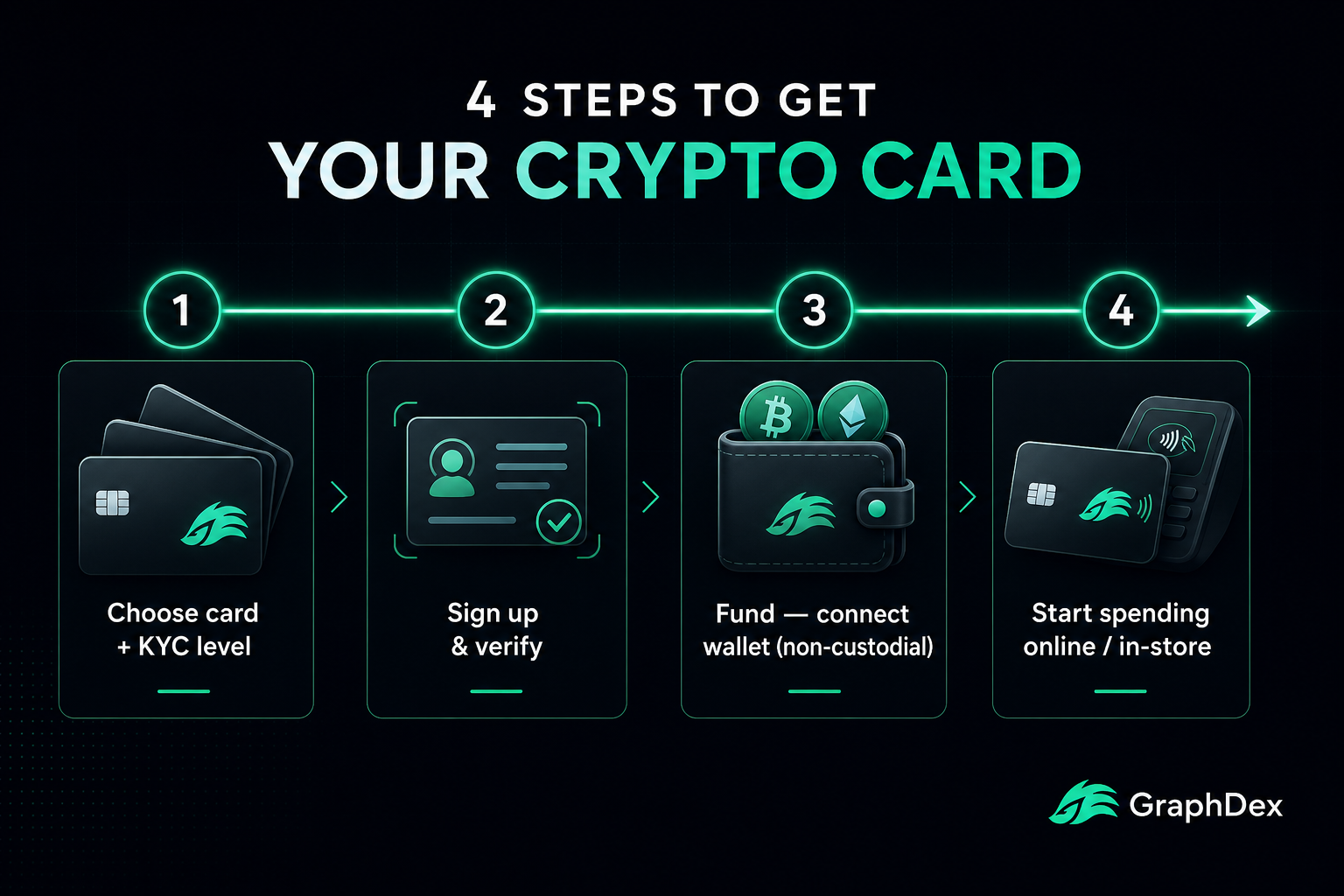
Getting a crypto card in 2026 takes four core steps, with verification scaling to your chosen level:
- Choose a card and KYC level — Level 1 (quick virtual card), Level 2 (standard), or Level 3 (physical, highest limits)
- Sign up and verify — Level 1 needs just email/phone; Level 3 needs ID, selfie, proof of address
- Fund the card — load crypto (USDT/USDC) from your wallet; with non-custodial cards, funds stay in your wallet
- Start spending — use the virtual card online or physical card in stores, anywhere the network is accepted
The smart path: Start with a Level 1 virtual card to test, then upgrade to Level 3 when you want a physical card and higher limits. With a non-custodial card like GraphPay, your crypto stays in your wallet at every step.
Get a GraphPay card in minutes
Key Takeaways
- Getting a crypto card takes four steps: choose level, verify, fund, spend.
- Level 1 needs minimal verification (minutes); Level 3 needs full ID for physical cards and high limits.
- Non-custodial cards let your crypto stay in your wallet — the card converts only when you spend.
- Start at Level 1 to test, then upgrade to Level 3 as your needs grow.
Before You Start: Two Key Decisions
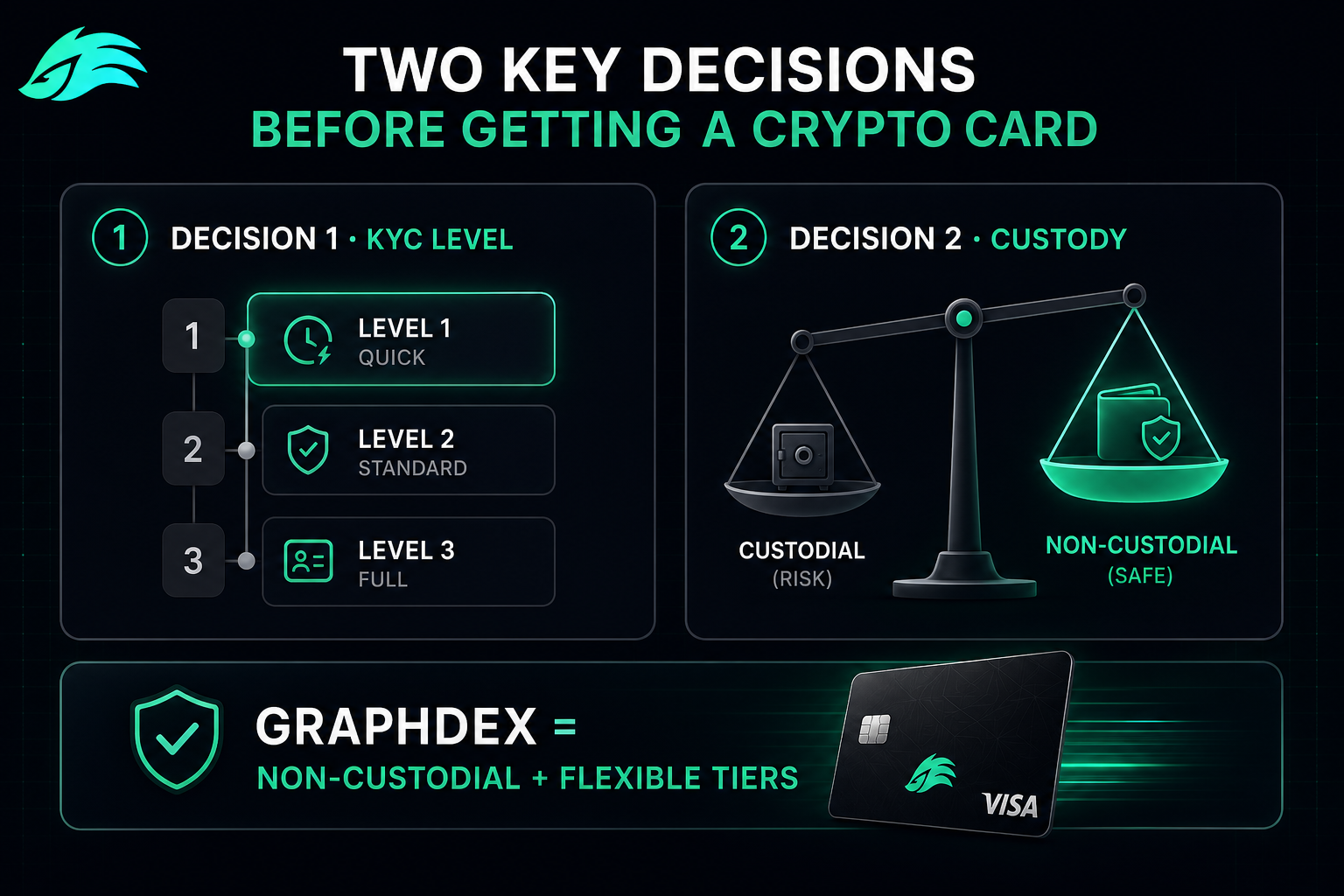
Before getting any crypto card, make two decisions that shape everything else.
Decision 1: Which KYC Level Do You Need?
Match the level to your intended use:
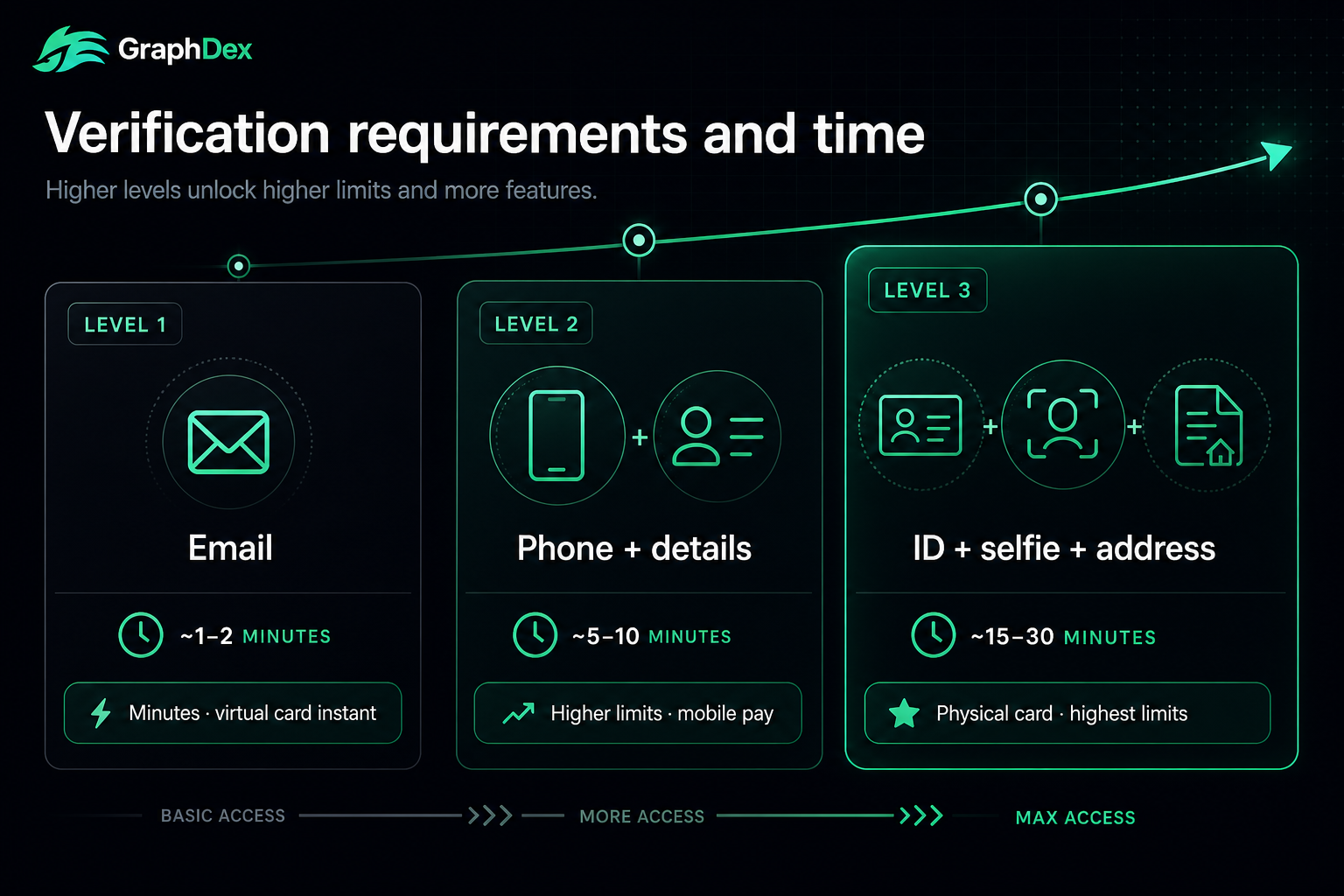
- Level 1 (Simplified): Quick virtual card for testing or small online payments. Email, sometimes phone. Lowest limits.
- Level 2 (Standard): Regular online spending, often with mobile pay. Phone + basic details. Moderate limits.
- Level 3 (Full): Everyday primary spending, physical card, highest limits. Government ID, selfie, proof of address.
You don't have to commit to Level 3 immediately — most cards let you start lower and upgrade.
Decision 2: Custodial or Non-Custodial?
This determines whether your funds are truly yours:
- Custodial: The issuer holds your funds. More convenient in some ways, but adds solvency and security risk.
- Non-custodial: Your crypto stays in your own wallet. The card authorizes conversion only when you spend. Safer, and increasingly recommended by regulators.
For most users, a non-custodial card with flexible KYC tiers (like GraphPay) offers the best combination — your funds stay yours, and you verify only as much as you need.
How Do You Choose Your Card and KYC Level?
Start by selecting a card that fits your needs and the verification level you want to begin with.
What to look for:
- Tiered KYC: Can you start at Level 1 and upgrade to Level 3 later? Flexibility matters.
- Custody model: Non-custodial keeps your funds in your wallet.
- Networks: Visa and Mastercard offer the widest global merchant acceptance.
- Supported chains/tokens: Can you load from the chains you use (BNB Chain, Ethereum, TRON) with the stablecoins you hold (USDT, USDC)?
- Geographic availability: Is the card available in your region?
- Fees: Top-up fees, issuance fees, FX rates.
For most users, the smart starting point is a Level 1 virtual card — it lets you test the card, verify it fits your needs, and start spending quickly, with the option to upgrade later.
GraphPay, for example, lets you start at Level 1 (virtual card, minimal verification) and upgrade through Level 2 and Level 3 as your usage grows — all non-custodial, on Visa and Mastercard rails, loadable from BNB Chain, Ethereum, or TRON.
Step 2: Sign Up and Verify (by Level)
The verification process scales with your chosen level.
Level 1 (Simplified) — Minutes
- Provide an email address (and sometimes a phone number)
- Create your account
- Your virtual card is typically issued instantly
That's it — no documents, no waiting. You're ready to fund and spend within minutes.
Level 2 (Standard) — Minutes
- Complete Level 1 steps
- Verify your phone number
- Provide basic identity details
- Unlock higher limits and often mobile pay
Still fast, with expanded capability.
Level 3 (Full) — Minutes to a Short Wait
- Complete lower-level steps
- Submit a government-issued ID
- Complete a selfie or facial scan (liveness check)
- Provide proof of address
- Wait for verification (often completed in minutes on modern platforms)
Level 3 unlocks the highest limits, physical card eligibility, and best economics.
Tip: Have your documents ready before starting Level 3 — a clear photo of your ID and a recent proof of address (utility bill, bank statement) speeds the process.
Step 3: Fund Your Card
How funding works depends on the custody model.
With a Non-Custodial Card (e.g., GraphPay)
Your crypto stays in your own wallet. You connect your wallet, and the card draws from it only when you spend — converting crypto to fiat at the point of sale.
- Connect your Web3 wallet
- Ensure you hold supported stablecoins (USDT, USDC) on a supported chain (BNB Chain, Ethereum, TRON)
- Your spending power reflects your wallet balance
- The card converts only the amount you spend, when you spend it
This means your funds never sit in a third party's custody — a key security advantage.
With a Custodial Card
You transfer crypto to the issuer, who holds it and converts it to a card balance.
- Send supported crypto to the provided address
- The balance is credited to your card (often after conversion)
- Funds are held by the issuer until you spend
Note the hidden cost to watch: Some cards apply an exchange-rate spread when converting crypto to fiat — typically 0.5-1.5% — that isn't always listed as an explicit "fee." Check the conversion rate against the market rate. Also review the top-up fee (the percentage charged when loading the card).
How Do You Start Spending?
With your card funded, you're ready to use it.
Virtual Card (All Levels)
- Use the card number, expiry, and CVV for online checkout
- Pay for subscriptions, digital services, online shopping
- Add to Apple Pay / Google Pay where supported (often Level 2+)
- Spend anywhere the network (Visa/Mastercard) is accepted online
Physical Card (Level 3)
- Tap-to-pay in stores
- ATM withdrawals (where supported)
- Full in-person merchant acceptance
- All the virtual card capabilities, plus physical use
Global acceptance: Cards on Visa and Mastercard rails are accepted at tens of millions of merchants worldwide, online and in-store — the same as any traditional card.
How Long Does It Take to Get a Crypto Card?
Timelines by level:
Level 1: Minutes. Sign up with email, get a virtual card instantly, fund, and spend — often under 5 minutes total.
Level 2: Minutes. Phone verification and basic details add a little time, but still typically same-session.
Level 3: Minutes to a short wait. Document verification (ID, selfie, proof of address) is often completed in minutes on modern platforms, though it can occasionally take longer depending on the provider and jurisdiction.
Physical card delivery (Level 3): The verification is fast, but physical card delivery takes shipping time — typically days to a couple of weeks depending on your location.
The fast path: If you need to spend crypto immediately, a Level 1 virtual card gets you there in minutes. Upgrade to Level 3 and order a physical card when you're ready for everyday use.
What Mistakes Should You Avoid When Getting a Crypto Card?
For balance, avoid these common errors:
1. Over-verifying before you need to. Don't jump to Level 3 if a Level 1 virtual card meets your current needs. Start light, upgrade when necessary.
2. Ignoring custody. A convenient custodial card adds risk. Check whether your funds stay in your wallet (non-custodial) or are held by the issuer.
3. Missing the exchange-rate spread. The stated top-up fee isn't the only cost. Check the crypto-to-fiat conversion rate against the market rate — spreads of 0.5-1.5% are common and often unlisted.
4. Choosing an unregulated "anonymous" card. Cards marketed as fully anonymous operate in grey areas with documented histories of sudden shutdowns and frozen funds. Choose regulated, tiered-KYC cards.
5. Not checking geographic availability. Confirm the card works in your country before signing up. Some cards have regional restrictions.
6. Loading more than you need (custodial cards). With custodial cards, only load what you'll spend soon. With non-custodial cards, this is less of a concern since funds stay in your wallet.
7. Skipping the chain/token check. Confirm the card supports the chains and stablecoins you actually hold before committing.
How GraphPay Makes Getting a Card Simple
GraphPay streamlines the process while keeping your funds secure through non-custodial architecture.
The GraphPay path:
- Choose your level — start at Level 1 for a quick virtual card, or go straight to Level 3 for a physical card
- Verify — Level 1 needs minimal info; upgrade verification as you need higher limits
- Connect your wallet — your crypto stays in your own wallet (Web3 infrastructure)
- Spend — the card converts crypto to fiat only when you spend, on Visa/Mastercard rails
What makes it simple and secure:
- Non-custodial: Your funds stay in your wallet at every level — no third-party custody
- Tiered KYC: Start light at Level 1, upgrade to Level 3 when you want a physical card and full limits
- Multi-chain: Load from BNB Chain, Ethereum, or TRON with USDT or USDC
- Global acceptance: Visa and Mastercard rails
- MiCA-aligned: Built for the compliant, self-custodial model regulators recommend
You get the speed of a quick Level 1 setup with the option to grow to a full Level 3 card — and your crypto stays yours throughout.
Start with a GraphPay Level 1 card
Related Guides
- Crypto Card KYC Levels Explained in 2026: Level 1 vs Level 2 vs Level 3
- Best Non-Custodial Crypto Cards in 2026: Keep Your Keys, Spend Anywhere
- Virtual vs Physical Crypto Cards in 2026: Which Should You Get?
Frequently Asked Questions
How do I get a crypto card in 2026? Four steps: (1) Choose a card and KYC level — Level 1 for a quick virtual card, Level 3 for a physical card; (2) Sign up and verify — Level 1 needs just email/phone, Level 3 needs ID and proof of address; (3) Fund the card — with non-custodial cards like GraphPay, your crypto stays in your wallet; (4) Start spending online or in stores. A Level 1 virtual card can be ready in minutes.
How long does it take to get a crypto card? A Level 1 virtual card takes minutes — sign up with email, get the card instantly, fund, and spend. Level 3 verification (ID, selfie, proof of address) is often completed in minutes on modern platforms. Physical card delivery (Level 3) takes additional shipping time — typically days to a couple of weeks depending on location.
Do I need ID to get a crypto card? Depends on the level. Level 1 (simplified) typically needs only email and sometimes phone — no ID. Level 2 adds phone verification and basic details. Level 3 (full) requires government ID, a selfie, and proof of address. Start at Level 1 if you want minimal verification; upgrade to Level 3 for higher limits and physical cards.
Can I get a crypto card without giving up custody of my funds? Yes — choose a non-custodial card like GraphPay. Your crypto stays in your own wallet, and the card authorizes conversion only when you spend. This is different from custodial cards where the issuer holds your funds. Non-custodial cards keep your assets under your control at every KYC level, which regulators increasingly recommend.
How do I fund a crypto card? With non-custodial cards, you connect your Web3 wallet holding supported stablecoins (USDT, USDC) on a supported chain (BNB Chain, Ethereum, TRON) — the card draws from your wallet only when you spend. With custodial cards, you transfer crypto to the issuer who credits your card balance. Watch for top-up fees and exchange-rate spreads (often 0.5-1.5%).
What can I buy with a crypto card? Anything accepted on the card's network (Visa/Mastercard) — tens of millions of merchants worldwide. Virtual cards work for online shopping, subscriptions, and digital services, plus Apple Pay / Google Pay where supported. Physical cards (Level 3) add in-store tap-to-pay and ATM withdrawals. The merchant sees a normal card payment; conversion from crypto happens behind the scenes.
Which crypto card should a beginner get? Beginners benefit from a non-custodial card with flexible tiers — start with a Level 1 virtual card to learn how it works with minimal verification and your funds staying in your wallet. Once comfortable, upgrade to Level 3 for a physical card and higher limits. This approach (start light, keep custody, upgrade as needed) minimizes both risk and friction.
About This Guide
This guide is published by the GraphPay Research team — building non-custodial crypto payment infrastructure. Our content is based on current card industry practices, regulatory frameworks, and 2026 market data.
Sources & data: Card setup processes, verification requirements, and timelines reflect publicly available information as of 2026 and may change. Specific requirements vary by provider and jurisdiction. This guide is educational and not financial or legal advice — always verify current terms with your provider and consult local regulations.
GraphPay is non-custodial crypto payment infrastructure — your crypto, your pay. Learn more at graphpay.io.
Last reviewed: May 2026 · GraphPay Research