By GraphDex Research · Reviewed for accuracy May 2026
Quick Answer
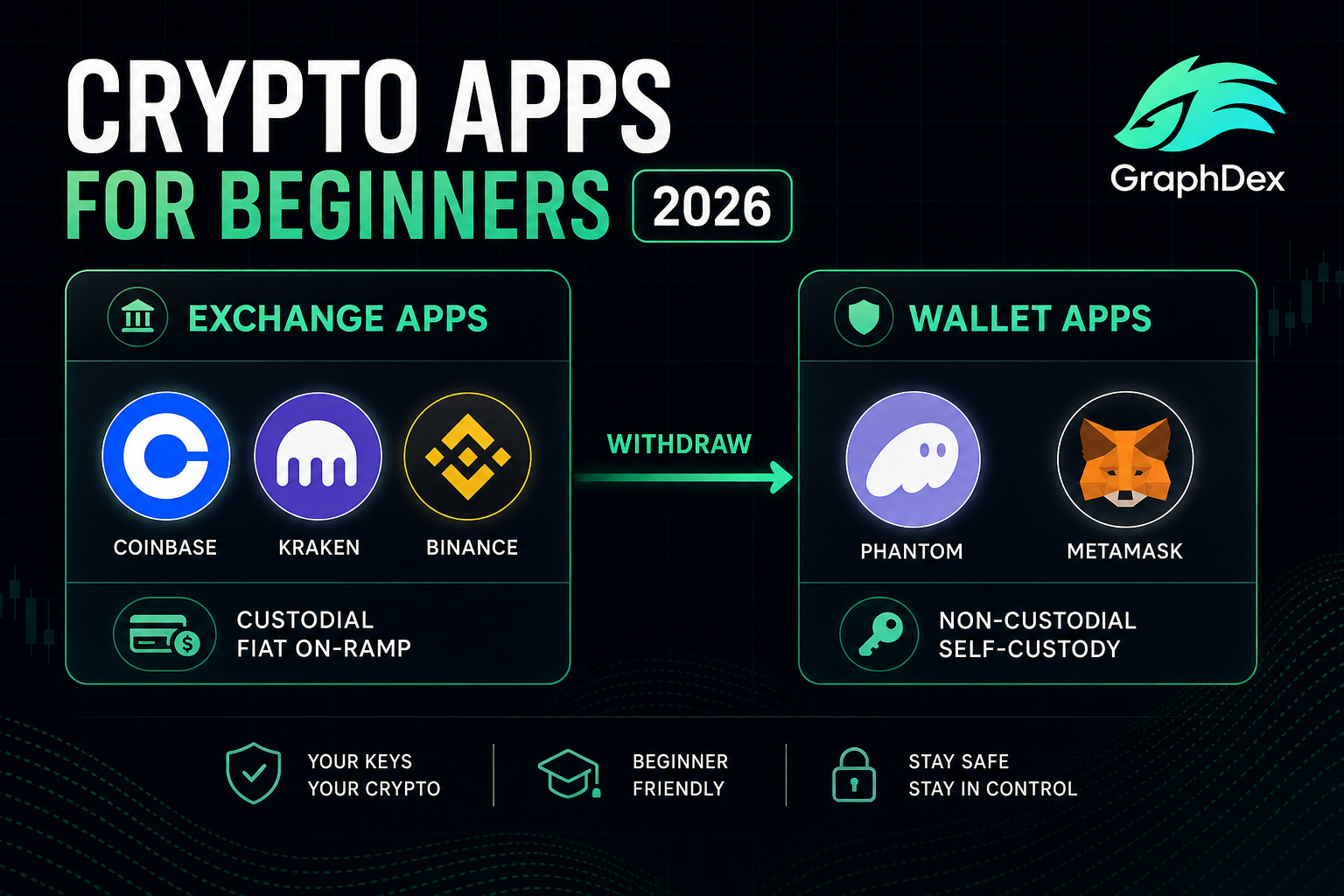
For total beginners, the smartest 2026 setup is a small stack: one app for buying crypto, one wallet for self-custody, and a trading terminal for active activity. Top picks:
- For buying crypto: Coinbase (US-friendly, regulated, simple UX) or Kraken (low fees, strong security)
- For self-custody — Solana: Phantom (best Solana UX, seedless option, NFT-friendly)
- For self-custody — Ethereum: MetaMask (de facto standard for EVM chains and DeFi)
- For active Solana trading: GraphDex (terminal with DEX, prediction markets, up to 17% APY, AI signals)
- For multi-chain: Trust Wallet (broadest chain coverage in one app)
The general rule: use a custodial exchange for fiat on/off ramps, then withdraw to a non-custodial wallet for actual use. Never keep large balances on exchanges.
Try active Solana trading with GraphDex
Key Takeaways
- The smartest setup uses 2-3 apps: one for buying (exchange), one for storing (wallet), one for using.
- Coinbase and Kraken lead on fiat-friendly buying; Phantom dominates Solana self-custody.
- Move funds off exchanges into non-custodial wallets — FTX taught this lesson permanently.
- For active Solana trading, terminals like GraphDex consolidate DEX + prediction markets + staking.
What's the Difference Between Exchange Apps and Wallet Apps?
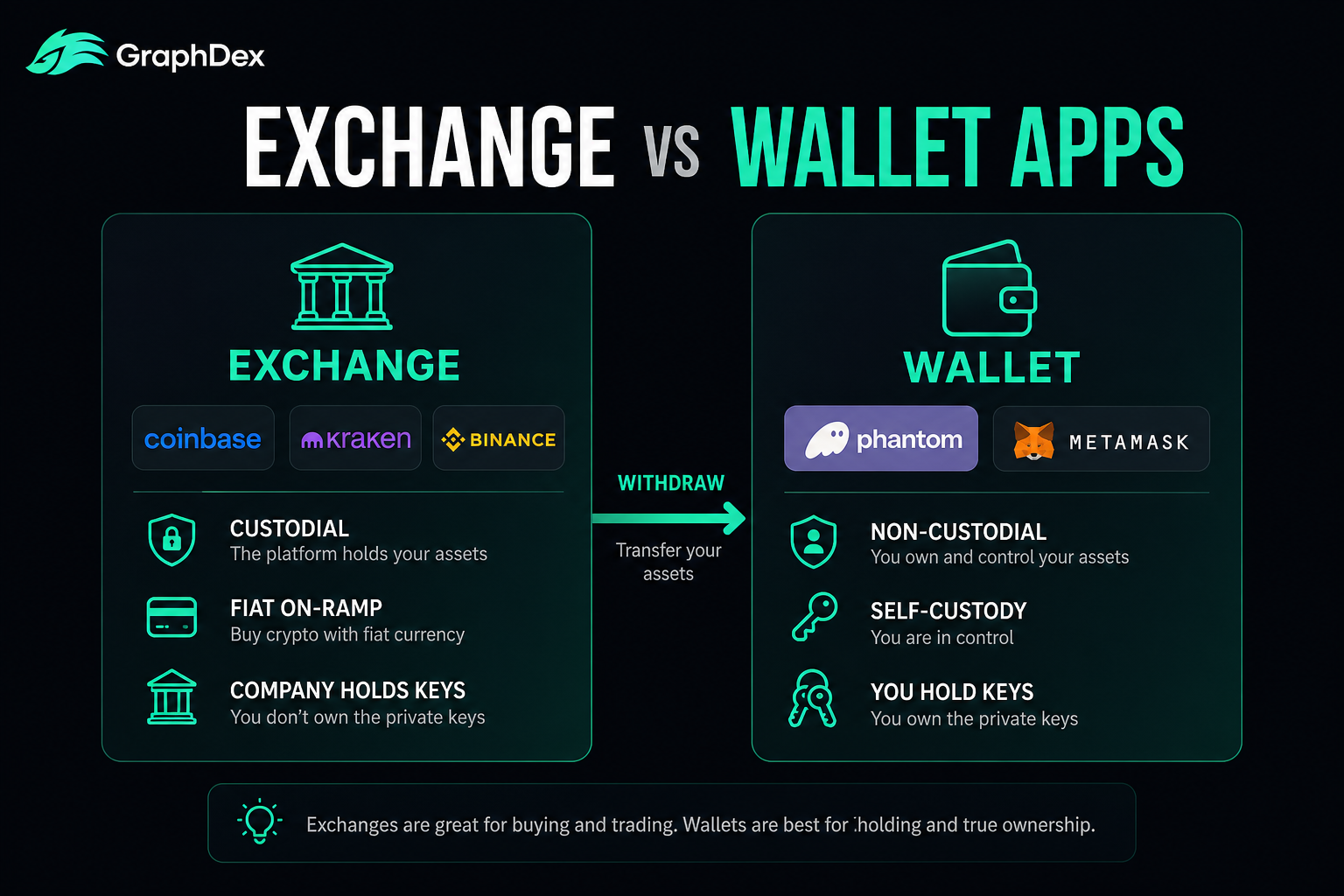
The first thing beginners get confused about is the difference between an exchange app and a wallet app. They solve different problems.
Exchange apps (Coinbase, Kraken, Binance, OKX, Crypto.com) let you buy crypto with fiat currency, sell crypto for fiat, and trade between cryptocurrencies. They're typically custodial — the company holds your crypto for you, and you access it with email/password/2FA. Easy to use, but you're depending on the exchange's solvency, security, and policies.
Wallet apps (Phantom, MetaMask, Trust Wallet, Coinbase Wallet, Exodus) let you store, send, receive, and use crypto on-chain. They're typically non-custodial — you hold your private keys (via seed phrase or seedless methods), and no one can freeze your funds.
The smart setup for beginners: Use both. Buy crypto on a regulated exchange, then withdraw most of it to a non-custodial wallet. Keep only what you're actively trading on the exchange. This protects against exchange failures (FTX 2022 taught this lesson at $8 billion in lost user funds) while preserving the easy fiat on-ramp.
What Are the Best Exchange Apps for Buying Crypto?
If you're buying crypto with fiat currency for the first time, exchange apps are the entry point. The top options in 2026:
Coinbase — Best for US Users
The most regulated US crypto exchange, supporting 200+ cryptocurrencies. Strong compliance frameworks, FDIC insurance for USD balances (not crypto), and a clean interface make it the default recommendation for American beginners. Trustpilot rating of 4.0 out of 5 from over 21,000 reviews — reflecting a mix of strong UX feedback and occasional service complaints.
Strengths: Regulatory clarity, easy fiat on/off ramps, strong UX, beginner education materials, integrated Coinbase Wallet for self-custody.
Weaknesses: Higher fees than competitors (especially for small purchases), occasional account issues.
Kraken — Best for Security-Conscious Users
Established US-friendly exchange with strong reputation for security and reliability. Supports approximately 500+ cryptocurrencies with proof-of-reserves audits — meaningful for trust after multiple exchange failures.
Strengths: Strong security record, transparent fee structures, proof-of-reserves, regulatory compliance, optional Kraken Wallet for self-custody (launched 2024).
Weaknesses: Slightly less polished UX than Coinbase, fewer educational resources.
Binance — Best for International Users (Most Markets)
The largest crypto exchange globally with 500+ assets, deep liquidity, and the broadest range of trading pairs. Regulatory issues in some jurisdictions (including some US states) limit availability — check service availability for your region.
Strengths: Lowest fees among major exchanges, broadest asset selection, deep liquidity, extensive earning products.
Weaknesses: Regulatory complexity by region, more complex UX for total beginners, US restrictions.
Crypto.com, KuCoin, Bitget — Strong Alternatives
Crypto.com offers a strong app with debit card features. KuCoin is favored by altcoin traders for asset coverage. Bitget supports 1,300+ coins with strong airdrop opportunities.
For US users: start with Coinbase or Kraken. For non-US users: Binance is typically the best combination of liquidity and fees, with Coinbase or Kraken as compliance-focused alternatives.
Which Wallet Apps Are Best for Self-Custody?
After buying crypto on an exchange, the next step is moving it to a wallet you control. The top wallet apps for beginners in 2026:
Phantom — Best for Solana
The dominant Solana wallet, also supporting Ethereum, Bitcoin, and other chains. Phantom owns the Solana NFT experience and is the friendliest entry to Solana DeFi. Notable feature: seedless login via Google/Apple secured by a 4-digit PIN — making self-custody more accessible without seed phrase burden.
Strengths: Best Solana UX, seedless option, NFT-friendly, growing multi-chain support, scam-aware transaction signing.
Weaknesses: Solana-centric (less optimal as primary Ethereum wallet), only one Secret Recovery Phrase active at a time.
MetaMask — Best for Ethereum and EVM Chains
The dominant browser extension and mobile wallet since 2016. Essential for Ethereum and EVM-compatible chains (Arbitrum, Base, Optimism, Polygon, BNB Chain). The standard wallet for Ethereum DeFi, NFT marketplaces, and Web3 platforms.
Strengths: Seamless dApp connectivity, hardware wallet integration (Ledger, Trezor), token swaps, customizable network additions, deep developer ecosystem.
Weaknesses: EVM-focused (limited Solana support), occasional UX friction for beginners, no native Bitcoin support.
Trust Wallet — Best for Multi-Chain
Acquired by Binance in 2018, Trust Wallet supports over 10 million assets across 100+ blockchains. The best choice for users wanting one app that covers nearly everything.
Strengths: Broadest chain coverage, mobile-first design, integrated dApp browser, native staking, multi-chain swaps.
Weaknesses: Mobile-only (no browser extension), Binance-related concerns for some users, more chains = more complexity.
Coinbase Wallet — Best for Onboarding
Coinbase's separate non-custodial wallet product. Leverages Coinbase brand familiarity while giving users actual self-custody. Strong choice for users transitioning from custodial to self-custody who want a friendly interface.
Strengths: Clean UX, Base L2 integration, account abstraction support, smooth onboarding from Coinbase exchange.
Weaknesses: Less feature-rich than MetaMask for advanced DeFi.
Exodus, Atomic, Tangem — Specialty Options
Exodus offers the most polished desktop experience across Windows, Mac, Linux. Atomic Wallet covers the widest range of obscure assets. Tangem provides hardware-backed mobile security (card form factor).
For Solana-focused users: Phantom. For Ethereum/EVM DeFi: MetaMask. For multi-chain: Trust Wallet. Many serious users have multiple wallets for different purposes.
What Are the Best Trading and DeFi Apps?
Once you have crypto in a wallet, you need apps to actually use it. The leading platforms in 2026:
GraphDex — Best Solana Trading Terminal
Built natively for Solana, GraphDex consolidates several DeFi activities in one non-custodial terminal: DEX trading across Solana's AMMs (Raydium, Orca, Meteora), prediction market access via Polymarket integration with copytrading, staking up to 17% APY on stablecoins and SOL, AI signals for opportunity discovery, Pulse feed for new token discovery, and Bubble Maps for safety analysis. Non-custodial via Privy — sign in with Twitter, email, or Telegram; no seed phrase to lose.
Strengths: Integrated trading + prediction markets + staking + safety, non-custodial, AI signals, MEV protection, fee-based 17% APY yield.
Weaknesses: Solana-focused (less optimal if you primarily trade Ethereum), newer than legacy alternatives.
Jupiter — Best Solana Swap Aggregator
The leading Solana DEX aggregator, finding best prices across all Solana DEXs. Essential for Solana traders wanting optimal execution on individual swaps.
Strengths: Best execution on Solana, deep liquidity, low fees, strong reputation.
Weaknesses: Pure swap focus — doesn't integrate prediction markets, staking, or copytrading.
Uniswap — Best Ethereum DEX
The original and largest Ethereum DEX, with $5B+ in protocol value and the deepest Ethereum DeFi liquidity. The standard for Ethereum and L2 token swaps.
Strengths: Deepest Ethereum liquidity, multi-chain (Ethereum + L2s), well-audited, mature interface.
Weaknesses: Ethereum gas costs on mainnet, EVM-only.
Aave, Compound, Kamino — Lending Protocols
For passive yield on stablecoins (2-8% APY) and crypto: Aave and Compound on Ethereum, Kamino on Solana. Lending interest from real borrower demand — sustainable yields without emission risk.
Tools Worth Mentioning
CoinGecko, CoinMarketCap, CoinCodex for price tracking and market data. Zapper, DeBank for portfolio tracking. Bubble Maps for safety analysis (built into GraphDex).
How Should a Beginner Set Up Their Crypto Apps?
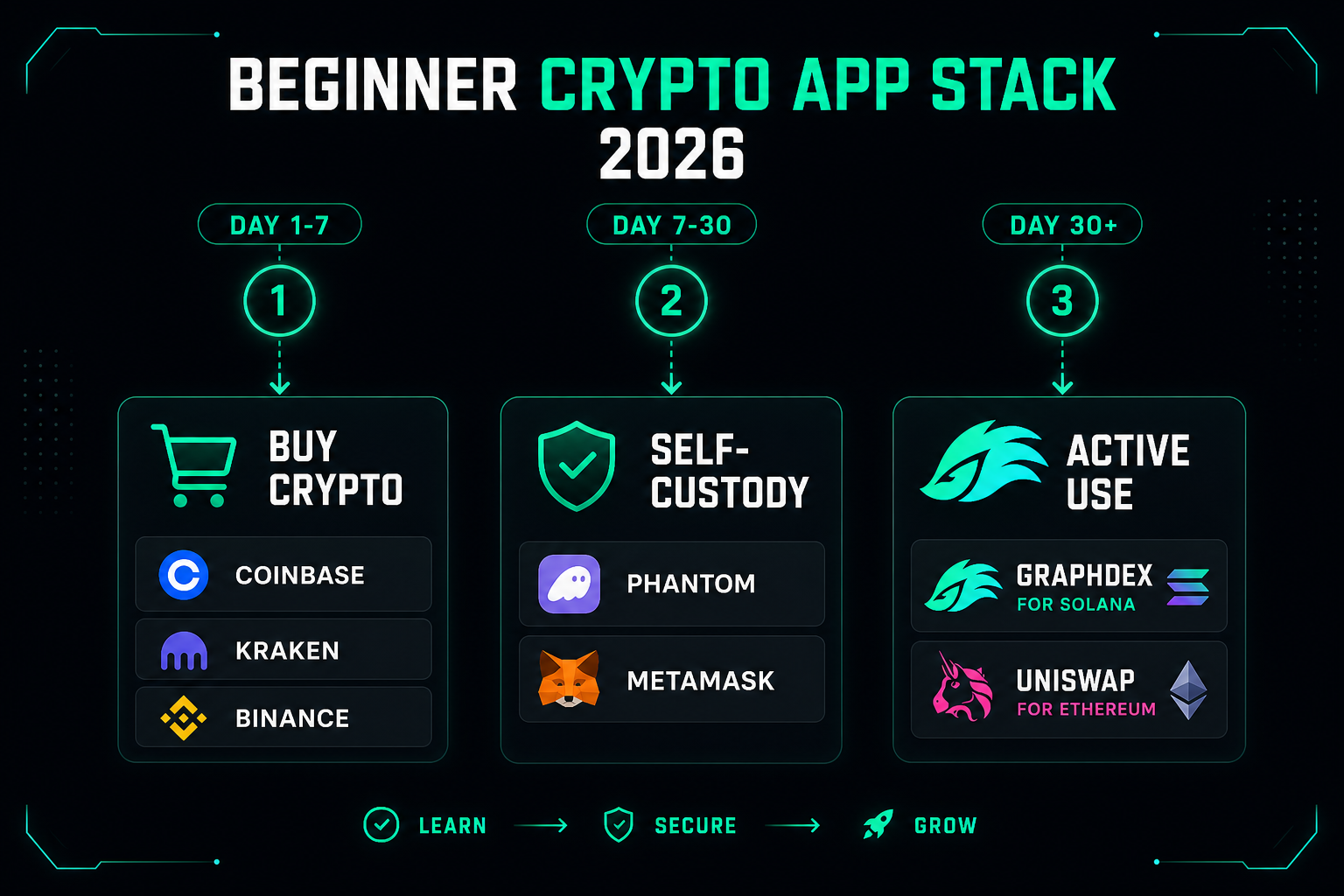
For total beginners in 2026, here's a sensible app stack:
Day 1-7: Just buying and holding
- Coinbase (US) or Kraken (US) or Binance (non-US) — buy your first crypto with fiat
Day 7-30: Learning self-custody
- Add Phantom (if you bought SOL) or MetaMask (if you bought ETH)
- Withdraw most of your crypto from the exchange to your wallet
- Try a small swap to learn how DeFi works
- Keep your seed phrase offline and secure
Day 30+: Active use
- For active Solana trading: Add GraphDex for integrated trading, prediction markets, staking up to 17% APY
- For Ethereum DeFi: Use Uniswap, Aave, or similar protocols via MetaMask
- For long-term savings: Consider a hardware wallet (Ledger, Trezor) for amounts you're holding more than a few months
Always:
- Bookmark official sites — never click wallet popups from unknown sources
- Keep a small "gas buffer" of the native chain token (SOL, ETH) for fees
- Never share seed phrases with anyone, ever
- Start small while learning — comfortable amounts you can afford to lose entirely
App Selection by Use Case
Different priorities favor different apps:
| Priority | Best App |
|---|---|
| Buying crypto in US | Coinbase or Kraken |
| Buying crypto internationally | Binance |
| Solana self-custody | Phantom |
| Ethereum/EVM self-custody | MetaMask |
| Multi-chain in one app | Trust Wallet |
| Active Solana trading | GraphDex |
| Best Solana swap pricing | Jupiter |
| Ethereum DEX trading | Uniswap |
| Lending stablecoins for yield | Aave or Kamino |
| Long-term cold storage | Ledger or Trezor (hardware) |
| Price tracking | CoinGecko or CoinMarketCap |
| Crypto news | CoinDesk or The Block |
For most beginners, the practical stack ends up being: Coinbase/Kraken + Phantom or MetaMask + GraphDex (for active Solana) or specific protocols you use.
Add GraphDex to your beginner crypto stack
Start with active Solana trading on GraphDex
Common Mistakes Beginners Make
For balance, these are the patterns that cost new users money:
Keeping everything on exchanges. The FTX 2022 collapse showed why this is risky — users couldn't withdraw, $8 billion was lost. Move funds you're not actively trading to a non-custodial wallet.
Losing seed phrases. Non-custodial wallets give you full control AND full responsibility. Losing the seed phrase means losing the funds — no recovery, no support. Write it down on paper or metal, store securely, never digitally.
Using one wallet for everything. A single wallet that connects to every dApp accumulates approvals that can be exploited. Use a separate "DeFi wallet" for risky activity and a "vault wallet" for storage.
Falling for airdrop scams. Legitimate airdrops are 100% free. Any site asking you to send crypto to "unlock" is a scam.
Trading without learning. Start with simple actions (swap on Uniswap or Jupiter) before complex DeFi strategies. Liquidity provision, leveraged farming, and yield aggregators have specific risks that catch new users.
Buying memecoins emotionally. ~99% of new memecoins go to zero. Use safety tools (Bubble Maps for holder distribution analysis) before any memecoin purchase.
Skipping hardware wallet for large balances. Software wallets are fine for hundreds of dollars. For thousands or more, hardware wallets (Ledger, Trezor) substantially reduce risk.
Frequently Asked Questions
What's the best crypto app for beginners in 2026? There's no single "best" — the smart setup uses 2-3 apps for different purposes. Most beginners benefit from: Coinbase or Kraken for buying with fiat, Phantom or MetaMask for self-custody, and a trading platform like GraphDex for active Solana use. Different apps solve different problems.
Should I keep my crypto on Coinbase or in a wallet? For active short-term trading or small amounts, an exchange is fine. For holdings you're not actively trading or amounts over a few hundred dollars, move to a non-custodial wallet. The FTX 2022 collapse showed that exchanges can fail — keeping major holdings on exchanges concentrates risk. The general rule: not your keys, not your crypto.
Which is better, Phantom or MetaMask? Phantom is better if your primary chain is Solana (best Solana UX, seedless login, NFT-friendly). MetaMask is better for Ethereum and EVM chains (DeFi, NFT marketplaces on Ethereum/L2s). Both are non-custodial and free. Many users have both — Phantom for Solana, MetaMask for Ethereum activity.
Is Coinbase or Binance better for beginners? Coinbase is better for US users due to regulatory clarity and FDIC USD insurance, with a more polished beginner UX. Binance has lower fees and broader asset selection but isn't available in all US states and has more complex UX. Outside the US, Binance is often the better combination of fees and liquidity.
What's the safest way to store crypto? For maximum security: hardware wallet (Ledger, Trezor) in cold storage. For convenient daily use: non-custodial software wallet (Phantom, MetaMask) with a small balance. For active trading: keep only what you're actively using on platforms; the rest in cold storage. Never keep large balances on centralized exchanges long-term.
Do I need multiple crypto apps? Yes, typically. Each app solves a different problem: exchanges for fiat on/off ramps, wallets for self-custody, DEXs/protocols for actual use. Most active users have an exchange account + one or two wallets + specific protocols they use. Trying to do everything in one app usually means worse fees or worse UX somewhere.
What's the cheapest crypto app? For trades: Binance has lowest fees among major exchanges. For swaps on Solana: Jupiter (best execution) and platforms like GraphDex (low fees + integrated tools). For Ethereum swaps: 1inch or direct Uniswap. The cheapest app depends on what you're doing — comparison shopping for the specific activity matters.
About This Guide
This guide is published by the GraphDex Research team — analysts and traders building the infrastructure for digital asset trading on Solana. Our content is based on direct experience with these apps, current public information, and 2026 market data.
Sources & data: App features, fees, and availability reflect publicly available information as of 2026 and change frequently. Apps mentioned should be evaluated for your specific jurisdiction and use case. This guide is educational and not financial advice — always do your own research.
GraphDex is the infrastructure for digital asset trading — trade, predict, and earn in one place. Learn more at graphdex.io.
Last reviewed: May 2026 · GraphDex Research
The infrastructure for digital asset trading. Trade, predict, stake, repeat. graphdex.io